

Real UiPath-ARDv1 Exam PDF Test Engine Practice Test Questions
UiPath UiPath-ARDv1 Real 2023 Braindumps Mock Exam Dumps
UiPath-ARDv1 exam is a multiple-choice type exam that consists of 45 questions to be answered in 90 minutes. The passing score for the exam is 70%, and the exam fee is $200. Candidates who successfully pass the UiPath-ARDv1 exam earn the UiPath Advanced RPA Developer certification, which is valid for two years. UiPath Advanced RPA Developer v1.0 Exam (UiARD) certification can be renewed by completing a new version of the exam or by earning continuing education credits through UiPath's learning portal.
UiPath-ARDv1 exam is a challenging exam that requires a significant amount of preparation. Candidates who wish to take the exam should have a strong understanding of UiPath RPA development concepts and should have experience working with the UiPath platform. UiPath offers a range of training courses and resources that can help candidates prepare for the exam and improve their skills.
NEW QUESTION # 49
You are developing a .xaml file to interact with multiple fields of a web page. You want to Auto Empty the fields that require input.
Which input method(s) will automatically empty the target input fields?
- A. "Default" and "SimulateType"
- B. "SendWindowMessages" only
- C. "SimulateType" and "SendWindowMessages"
- D. "SimulateType" only
Answer: C
NEW QUESTION # 50
A developer creates an automation solution that processes a specific file stored in a Shared location. A developer uses Add Log Fields activity to add a field that indicates which file is being processed during each run. Which name of the field would cause the logging process to become corrupted?
- A. fileName
- B. file
- C. processedFile
- D. nameOfTheFile
Answer: A
Explanation:
Creating custom log fields that have the same name as a default log field causes the logging process to become corrupted and may cause issues in the workflow you are running.
For example, creating a custom log field called fileName causes this issue, as fileName is a log field that is generated by default.
Default fields
These log fields are present in all execution type logs, such as SQL (if configured), Elasticsearch (if configured), and the default EventViewer Logs:
Message - The log message.
Level - Defines the log severity.
Timestamp - The exact date and time the action was performed.
FileName - The name of the .xaml file being executed.
jobId - The key of the job running the process.
processName - The name of the process that triggered the logging.
processVersion - The version number of the process.
windowsIdentity - The name of the user that performed the action that was logged.
robotName - The name of the robot (as defined in Orchestrator).
UiPath Documentation
Exam Topic: Describe how to write coherent log messages (default or user-defined), and how to use them to diagnose and debug a production process running in UiPath Studio
NEW QUESTION # 51
A developer has added a Log Message activity in the Catch block of a Try Catch activity. The Log Message activity is executed when the process tries to recover from an unknown System Exception.
What is the recommended level for the Log Message activity?
- A. Trace
- B. Error
- C. Fatal
- D. Info
Answer: A
NEW QUESTION # 52
Which of the following activities searches for a UI element by using a position relative to a fixed element?
- A. Find Element
- B. Element Exists
- C. Anchor Base
- D. Find Relative Element
Answer: D
Explanation:
Find Relative Element - searches for a UI element by using a position relative to a fixed element. This should be used when a reliable selector is not available.
Anchor Base - searches for a UI element by using other UI elements as anchors. This should be used when a reliable selector is not available.
Find Element - waits for the specified UI element to appear on the screen (to be in the foreground) and returns it as a UiElement variable.
Element Exists - enables you to verify if a UI element exists, even if it is not visible, and returns a Boolean value.
UiPath Documentation
Exam Topic: Describe how Tags and Attributes, Dynamic Selectors, Anchor Base, etc. are used in UI Explorer to create a robust selector in the Default, Active Accessibility, or UI Automation frameworks
NEW QUESTION # 53
A developer automated a business process based on the Dispatcher and Performer model using two automation projects. Each project file has several invoked workflow files. Before publishing, the developer wants to ensure all unexpected exceptions are caught.
How many Global Exception Handlers can be set?
- A. Only one per business process
- B. Equal to the number of workflow files
- C. Only one per automation project
- D. Equal to the number of Try Catch activities
Answer: D
NEW QUESTION # 54
A developer uses a Lookup Data Table activity to return an email address of a person. What will be the result of the execution of the following seqeunce?
Please find the Build Data Table activity below
Please find the properties of Lookup Data Table activity below
- A. [email protected]
- B. An error will be thrown.
- C. [email protected]
- D. [email protected]
Answer: C
Explanation:
Data Table is zero-based, so ColumnIndex 1 is actually the second column of the data table, "Last Name" column.
Lookup Data Table activity returns the first result of the search, so as there are 2 rows with Last Name equl to "Joe", the value from the first found row will be returned - [email protected].
UiPath Documentation
Exam Topic: Describe how to work with complex data structures and data manipulation; for example, datatables and collections
NEW QUESTION # 55
A developer created an automation project in the Robotic Enterprise (RE) Framework which needs to enter a User ID depending on the machine it runs on. The User ID is stored in Orchestrator as a Text asset using the Value Per Account-Machine method.
Which steps should the developer perform to use this asset in the project?
- A. Add a row in the Settings sheet in Config.xlsx with the name of the Orchestrator asset.
In the workflow, retrieve the User ID by referencing the Config dictionary. - B. Add a row in the Assets sheet in Config.xlsx with the name of the Orchestrator asset.
Use the Get Asset activity in the workflow to get the User ID. - C. Add a row in the Settings sheet in Config.xlsx with the name of the Orchestrator asset.
Use the Get Asset activity in the workflow to get the User ID. - D. Add a row in the Assets sheet in Config.xlsx with the name of the Orchestrator asset.
In the workflow, retrieve the User ID by referencing the Config dictionary.
Answer: B
NEW QUESTION # 56
A developer created a project in the Robotic Enterprise (RE) Framework. The Config.xlsx has the Asset entry shown in the exhibit:
Assuming the default REFramework configuration, how can the developer reference the Asset in the Config variable so that the dictionary returns the asset value as a String?
- A. Config("HR_EmployeeOnboarding_Text_SME_EmailAddress").ToString
- B. Config("HR_EmployeeOnboarding_Text_SME_EmailAddress","SME_EmailAddress").ToString
- C. Config("SME_EmailAddress").ToString
- D. Config("SME_EmailAddress","HR_EmployeeOnboarding_Text_SME_EmailAddress").ToString
Answer: A
NEW QUESTION # 57
A developer wants to use a Basic recorder to capture several clicks on a website. What type of selectors will be generated during recording?
- A. Basic recorder does not allow to capture actions on websites.
- B. Dynamic
- C. Partial
- D. Full
Answer: D
Explanation:
Basic recording type generates a full selector for each activity and no container. The resulted automation is slower than one that uses containers and is suitable for single activities.
UiPath Documentation
Exam Topic: Describe the differences between using full selectors versus using partial selectors
NEW QUESTION # 58
An attended automation user wants to run two background processes in UiPath Assistant: UpdateTimecards Process and GetPTODays Process. What is a characteristic of running these processes?
- A. UpdateTimecards Process and GetPTODays Process can be run concurrently only if started from Orchestrator
- B. UpdateTimecards Process and GetPTODays Process can be run concurrently
- C. An exception is thrown if the processes are executed concurrently
- D. UpdateTimecards Process and GetPTODays Process can only be run sequentially
Answer: B
NEW QUESTION # 59
In a Robotic Enterprise (RE) Framework project that is connected to Orchestrator, what is the correct sequence of steps if an application exception occurs on a Queue Item in the Process Transaction state?
NOTE: Drag the Description found on the "Left" and drop on the correct Step Sequence found on the "Right".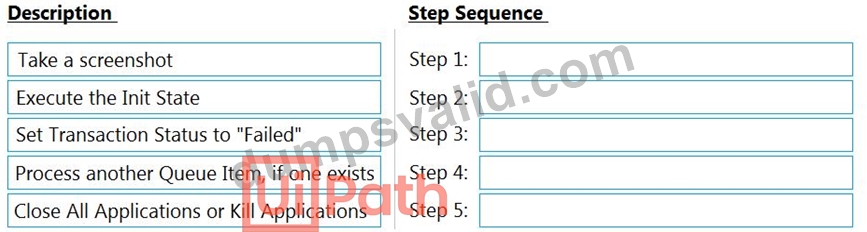
Answer:
Explanation:
NEW QUESTION # 60
Which activities allow you to iterate through an array of strings?
Options are :
- A. For Each
- B. While
- C. Do While
- D. For Each Row
Answer: A,B,C
NEW QUESTION # 61
A developer configured the Activity Project Settings for a UI automation and a Click activity in the project shown in the following exhibits: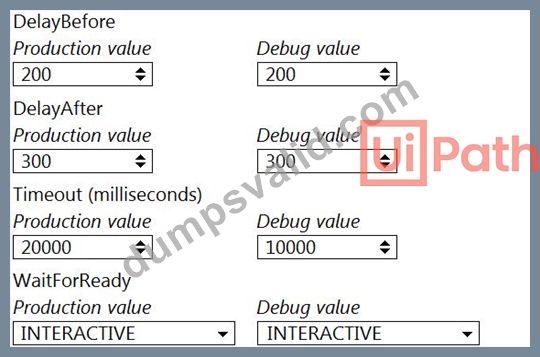

If the target element is not found during execution in Debug mode, how long will it take until an error is thrown?
- A. 30 seconds
- B. 10 seconds
- C. 20 seconds
- D. 15 seconds
Answer: D
NEW QUESTION # 62
A developer wants to use the Robotic Enterprise (RE) Framework to automate a business process. The TransactionData of this process is a collection(List<String>) of vendor names.
From the drop-down list shown in the exhibit, select the variable type for the TransactionItem.
Answer:
Explanation: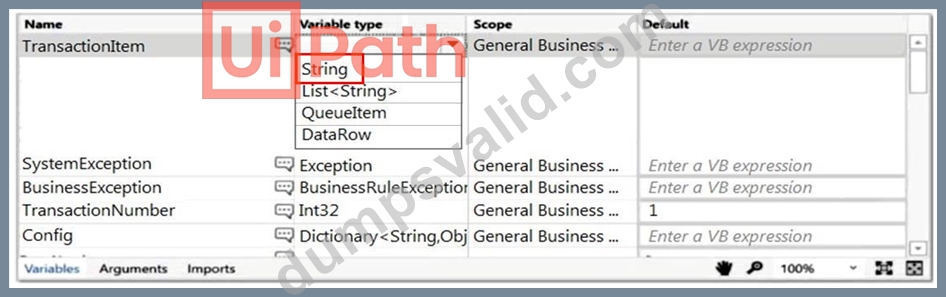
NEW QUESTION # 63
A developer extracts data about employees from an Excel workbook. The developer uses the following expression to filter the extracted datatable.
extractedDataTable.Select("[Age]>=21 AND ([Education]='Master' OR [Salary]>100000) AND [Education]='Bachelor'") How many rows will be returned as the result of the filtering?
Please find below the worksheet with data.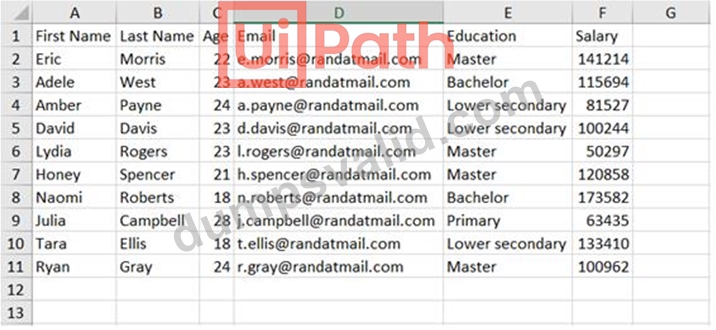
- A. 0
- B. 1
- C. 2
- D. 3
Answer: B
Explanation:
The expression [Education]='Master' OR [Salary]>100000 would return all rows except for 4 and 9.
Next, [Age]>=21 would also eliminate rows 8 and 10.
Out of the remaining rows, only row 3 has a Bachelor degree, so [Education]='Bachelor' would leave only that 1 row.
UiPath forum
Exam Topic: Describe how to initialize variables such as lists and datatables, and how to filter datatables
NEW QUESTION # 64
What can be used to debug a workflow?
Options are :
- A. Breakpoints
- B. Highlighting activities.
- C. The Slow Step option.
Answer: A,C
NEW QUESTION # 65
A developer is creating an automation project which processes personal information of employees.
To protect sensitive information that is logged during the execution of the automation at the Verbose level, how can the developer avoid logging variable and argument values in both Orchestrator and Studio?
- A. Check the Isolated property when invoking a workflow with sensitive information.
- B. Ensure all personal information variables are of the SecureString variable type.
- C. Store all sensitive information in an Excel file that the process can access.
- D. Check the Private property on the activities that contain sensitive information.
Answer: D
NEW QUESTION # 66
Which of the following types of variables can be defined in UiPath Studio?
Options are :
- A. GenericValue.
- B. Number.
- C. DataTable
Answer: A,C
NEW QUESTION # 67
A developer was reviewing an Orchestration process whose "main" attribute is set to Main.xaml in project.json.
However, the process is not pausing as intended. What is a possible cause for this issue?
- A. Process created a task in the Orchestrator.
- B. "Wait for Form Task and Resume" activity was called in Main.xaml.
- C. UI activities were not used in the process.
- D. "Wait for Form Task and Resume" activity was called in GetApproval.xaml.
Answer: C
NEW QUESTION # 68
Which activity cannot be used as a Condition in a Retry Scope activity?
- A. Is Match
- B. Check True
- C. Exists In Collection
- D. Path Exists
Answer: D
Explanation:
Retry Scope condition can be one of the activities that return a boolean. Even though the Path Exists activity also returns a Boolean value, it cannot be used in Retry Scope, it is an exception.
Instead of using Path Exists activity, you can use a Check True activity and as a condition place System.IO.File.Exists(filepath).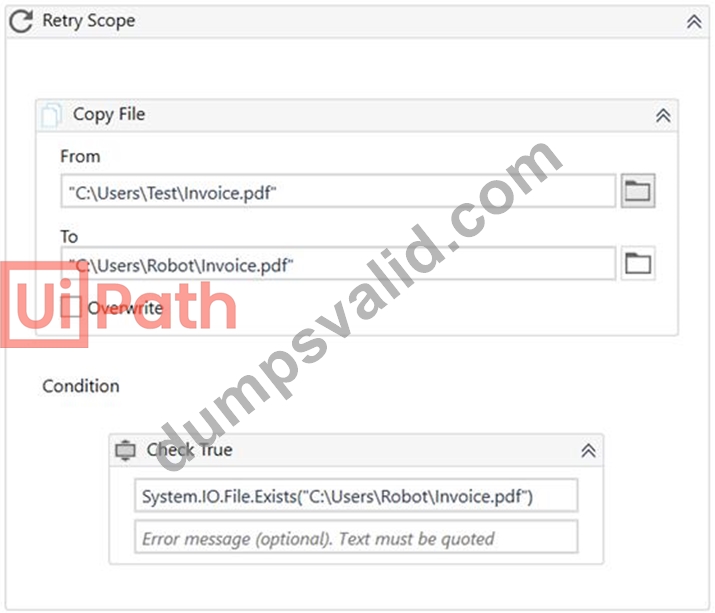
UiPath Documentation
UiPath Forum
Exam Topic: Identify and describe the use of the error handling activities such as Try Catch, Throw, Rethrow, Retry Scope, and Global Exception Handler.
NEW QUESTION # 69
Which of the following are considered best practices? Select all the options that apply.
Options are :
- A. Reusing workflows across different projects.
- B. Keeping environment settings hard coded inside workflows.
- C. Breaking the process into smaller workflows.
Answer: A,C
NEW QUESTION # 70
A developer has created a project to scrape structured data from Service Desk tickets. Upon review, the developer discovered that the Extract Structured Data activity was set to retrieve 50 results. The activity needs to be updated to retrieve all available results.
From the drop-down list shown in the exhibit, select the correct value that should be used to update the MaxNumberOfResults property.
Answer:
Explanation:
NEW QUESTION # 71
A developer is adding a Log Message activity in an Exit section of a single state within a state machine. When will the Log Message activity in the Exit section be executed?
- A. After the activities in the Entry section and the activities in the trigger are executed.
- B. After the activities in the Entry section are executed and the transition to the next state is confirmed.
- C. After the activities in the Entry section are executed, but only if there are exceptions.
- D. Immediately after the activities in the Entry section are executed.
Answer: B
NEW QUESTION # 72
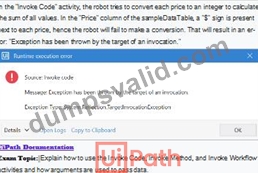
A developer is working with a variable named sampleDataTable of type DataTable in the following sequence. In the Invoke Code activity, the developer wants to sum up all values from column "Price" in the sampleDataTable. What will be the result of the processing?


- A. Message Box" activity will display the value "0".
- B. "Message Box" activity will display the value "120".
- C. An Error Message will be displayed.
- D. "Message Box" activity will display the value "320".
Answer: C
Explanation:
NEW QUESTION # 73
You want to automate a process on the https://acme-test.uipath.com/work-items web page. On this page, the following table is displayed:
You observe that the selector of the element highlighted in red is:
<html app='chrome.exe' title='ACME System 1 - Work Items' />
<webctrl tag='TABLE' />
<webctrl tag='TD' tableCol='2' tableRow='2' />
What is a valid selector to get the 5-th element in the WIID column?
- A. <html app='chrome.exe' title='ACME System 1 - Work Items' />
<webctrl tag='TABLE' />
<webctrl tag='TD' tableCol='5' tableRow='2' /> - B. <html app='chrome.exe' title='ACME System 1 - Work Items' />
<webctrl tag='TABLE' />
<webctrl tag='TD' tableCol='6' tableRow='2' /> - C. <html app='chrome.exe' title='ACME System 1 - Work Items' />
<webctrl tag='TABLE' />
<webctrl tag='TD' tableCol='2' tableRow='5' /> - D. <html app='chrome.exe' title='ACME System 1 - Work Items' />
<webctrl tag='TABLE' />
<webctrl tag='TD' tableCol='2' tableRow='6' />
Answer: D
NEW QUESTION # 74
......
Prepare For The UiPath-ARDv1 Question Papers In Advance: https://www.dumpsvalid.com/UiPath-ARDv1-still-valid-exam.html
Released UiPath UiPath-ARDv1 Updated Questions PDF: https://drive.google.com/open?id=1ziP6WqKfVzJ_WyNPRvnbwfUVsCBSrx8S