

SC-401 Dumps - Kickstart your Career with Real Updated Questions
Earn Quick And Easy Success With SC-401 Dumps
Microsoft SC-401 Exam Syllabus Topics:
| Topic | Details |
|---|---|
| Topic 1 |
|
| Topic 2 |
|
| Topic 3 |
|
| Topic 4 |
|
NEW QUESTION # 34
You have a Microsoft 365 E5 subscription that contains a retention policy named RP1 as shown in the following table.
You place a preservation lock on RP1.
You need to modify RP1.
Which two modifications can you perform? Each correct answer presents part of the solution.
NOTE: Each correct selection is worth one point.
- A. Increase the retention period of the policy.
- B. Decrease the retention period of the policy.
- C. Remove locations from the policy.
- D. Delete the policy.
- E. Add locations to the policy.
- F. Disable the policy.
Answer: A,E
Explanation:
A Preservation Lock in Microsoft Purview Retention Policies enforces strict compliance and prevents certain modifications to ensure data is retained according to compliance requirements.
When a Preservation Lock is applied:
1. You cannot disable or delete the policy.
2. You cannot remove locations from the policy.
3. You cannot decrease the retention period.
4. You can add locations to the policy.
5. You can increase the retention period.
You can expand the retention policy to cover additional locations (e.g., more Exchange mailboxes, SharePoint sites). You can extend the retention duration (e.g., increase from 5 years to 10 years) since this aligns with stricter compliance.
NEW QUESTION # 35
You have a Microsoft 365 E5 subscription that contains a Microsoft SharePoint Online site named Site1.
You need to implement Microsoft Purview data lifecycle management.
What should you create first?
- A. a retention label
- B. a data loss prevention (DLP) policy
- C. a sensitivity label policy
- D. an auto-labeling policy
Answer: A
Explanation:
To implement Microsoft Purview Data Lifecycle Management for SharePoint Online (Site1), you need to create a retention label first. Retention labels define how long content should be retained or deleted based on compliance requirements. Once a retention label is created, it can be manually or automatically applied to content in SharePoint Online, Exchange, OneDrive, and Teams. After creating a retention label, you can configure label policies to apply them to Site1 and other locations.
NEW QUESTION # 36
How many files in Site2 can User1 and User2 access after you turn on DLPpolicy1? To answer, select the appropriate options in the answer area.
NOTE: Each correct selection is worth one point.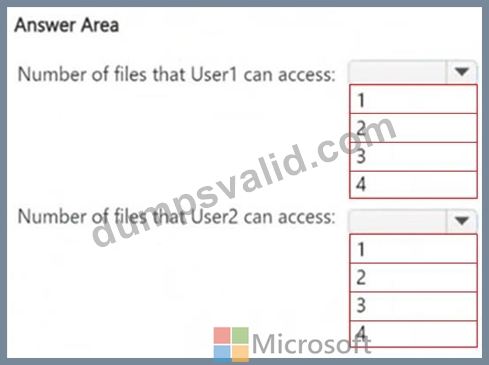
Answer:
Explanation: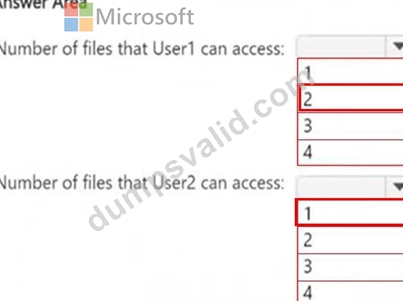
NEW QUESTION # 37
You have a Microsoft 365 E5 subscription that has data loss prevention (DLP) implemented.
You plan to export DLP activity by using Activity explorer.
The exported file needs to display the sensitive info type detected for each DLP rule match.
What should you do in Activity explorer before exporting the data, and in which file format is the file exported? To answer, select the appropriate options in the answer area.
NOTE: Each correct selection is worth one point.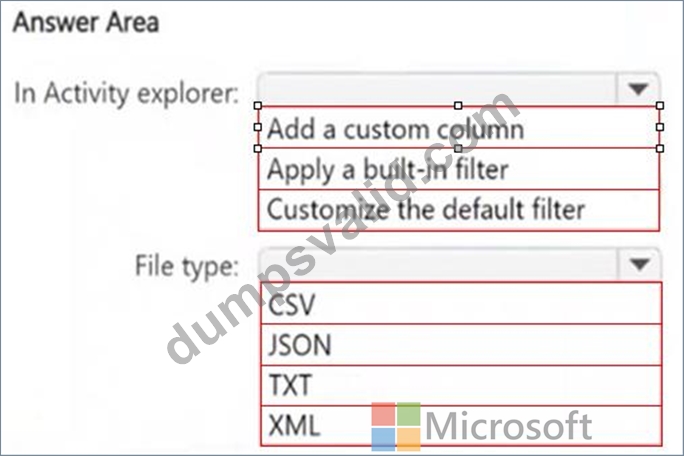
Answer:
Explanation: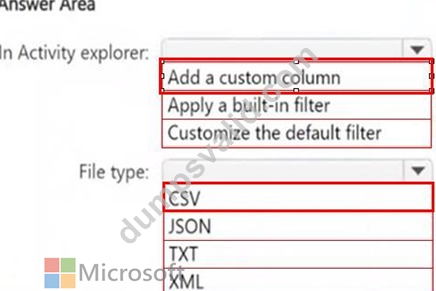
NEW QUESTION # 38
You need to meet the technical requirements for the creation of the sensitivity labels.
To which user or users must you assign the Sensitivity Label Administrator role?
- A. Admin1 and Admin4 only
- B. Admin1, Admin2, Admin4, and Admin5 only
- C. Admin1 and Admin5 only
- D. Admin1, Admin2, and Admin3 only
- E. Admin1 only
Answer: D
Explanation:
To meet the requirement that all administrative users must be able to create Microsoft 365 sensitivity labels, we need to assign the Sensitivity Label Administrator role to the correct users.
Sensitivity Label Administrator Role Responsibilities
This role allows users to:
*Create and manage sensitivity labels in Microsoft Purview.
*Publish and configure auto-labeling policies.
*Modify label encryption and content marking settings.
Review of Admin Roles from the Table: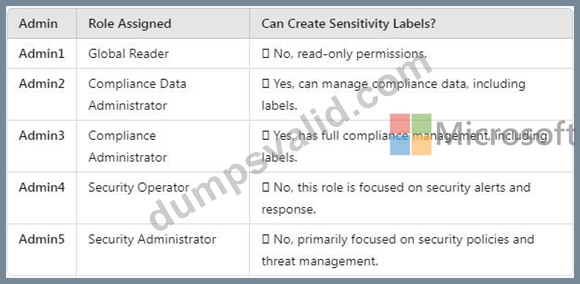
Users that must be assigned the Sensitivity Label Administrator role:
*Admin2 (Compliance Data Administrator)
*Admin3 (Compliance Administrator)
*Admin1 (Global Reader) (should be assigned this role to fulfill the requirement that all admins can create labels).
NEW QUESTION # 39
You have a Microsoft 365 E5 subscription that has data loss prevention (DLP) implemented.
You need to create a custom sensitive info type. The solution must meet the following requirements:
*Match product serial numbers that contain a 10-character alphanumeric string.
*Ensure that the abbreviation of SN appears within six characters of each product serial number.
*Exclude a test serial number of 1111111111 from a match.
Which pattern settings should you configure for each requirement? To answer, drag the appropriate settings to the correct requirements. Each setting may be used once, more than once, or not at all. You may need to drag the split bar between panes or scroll to view content.
NOTE: Each correct selection is worth one point.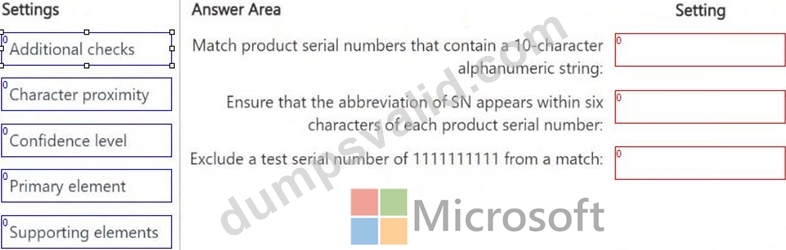
Answer:
Explanation: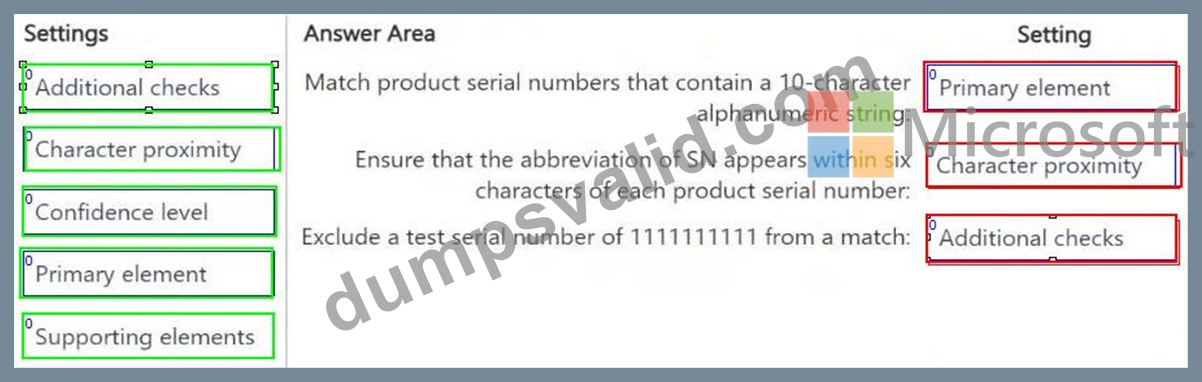
NEW QUESTION # 40
You have Microsoft 365 E5 subscription that uses data loss prevention (DLP) to protect sensitive information.
You have a document named Form.docx.
You plan to use PowerShell to create a document fingerprint based on Form.docx.
You need to first connect to the subscription.
Which cmdlet should you run?
- A. Connect-MgGraph
- B. Connect-ExchangeOnline
- C. Connect-SPOService
- D. Connect-IPPSSession
Answer: D
Explanation:
To create a document fingerprint in Microsoft 365 Data Loss Prevention (DLP), you need to use PowerShell for Microsoft Purview. The correct cmdlet to connect to the Microsoft 365 Security & Compliance Center (where DLP policies are managed) is Connect-IPPSSession. This cmdlet establishes a PowerShell session to manage DLP policies, compliance settings, and document fingerprinting.
NEW QUESTION # 41
You have a Microsoft 365 E5 subscription that contains two Microsoft 365 groups named Group1 and Group2. Both groups use the following resources:
*A group mailbox
*Microsoft Teams channel messages
*A Microsoft SharePoint Online teams site
You create the objects shown in the following table.
To which resources will AutoApply1 and Retention1 be applied? To answer, select the appropriate options in the answer area.
NOTE: Each correct selection is worth one point.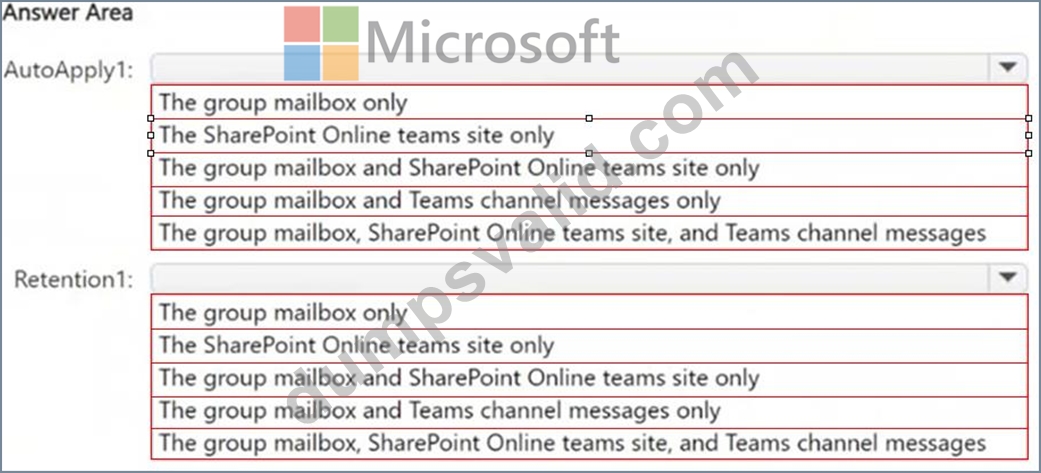
Answer:
Explanation: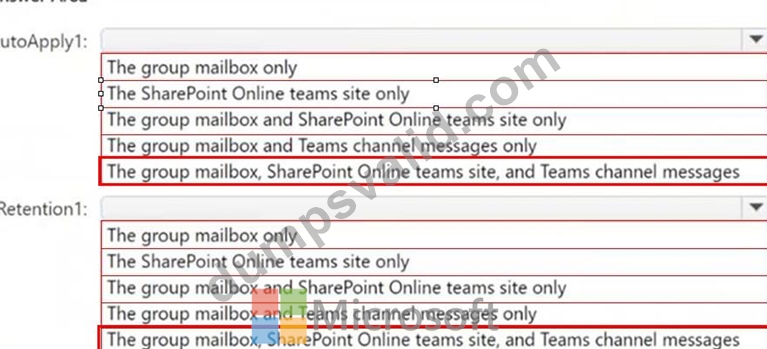
NEW QUESTION # 42
You have a Microsoft 365 E5 subscription that contains a trainable classifier named Trainable1.
You plan to create the items shown in the following table.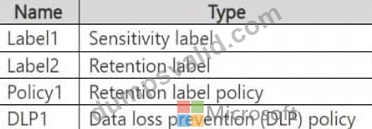
Which items can use Trainable 1?
- A. Label2, Policy1, and DLP1 only
- B. Label1 and Label2 only
- C. Label2 only
- D. Label1 and Policy1 only
- E. Label1, Label2, Policy1, and DLP1
Answer: A
Explanation:
A trainable classifier in Microsoft Purview is used to automatically identify and classify unstructured data based on content patterns. The classifier can be used in:
1. Retention Labels (Label2) → Supported
*Trainable classifiers can be linked to retention labels to automatically classify and apply retention policies to documents.
2. Retention Label Policies (Policy1) → Supported
*Retention label policies define how and where retention labels are applied, including automatically using trainable classifiers.
3. Data Loss Prevention (DLP) Policies (DLP1) → Supported
*Trainable classifiers can be used in DLP policies to detect and protect sensitive content automatically.
NEW QUESTION # 43
You are creating a data loss prevention (DLP) policy that will apply to all available locations except Fabric and Power BI workspaces.
You configure an advanced DLP rule in the policy.
Which type of condition can you use in the rule?
- A. Sensitive info type
- B. Sensitive label
- C. Keywords
- D. Content search query
Answer: A
Explanation:
When configuring an advanced DLP rule in Microsoft Purview Data Loss Prevention (DLP), you can use a Sensitive Information Type (SIT) condition to detect and classify specific types of sensitive data, such as credit card numbers, Social Security numbers, or custom sensitive data patterns. This allows you to apply protection and trigger actions based on the identified content.
NEW QUESTION # 44
You receive an email that contains a list of words that will be used for a sensitive information type.
You need to create a file that can be used as the source of a keyword dictionary.
In which format should you save the list?
- A. an XML file that contains a keyword tag for each word
- B. a text file that has one word on each line
- C. an ACCDB database file that contains a table named Dictionary
- D. an XLSX file that contains one word in each cell of the first row
Answer: B
Explanation:
To create a keyword dictionary for a sensitive information type in Microsoft Purview Data Loss Prevention (DLP), you must use a plain text (.txt) file where each keyword is on a separate line.
Format Example (TXT file):
confidential
sensitive
classified
top secret
This format is simple, efficient, and directly compatible with Microsoft 365 DLP policies for keyword dictionaries.
How to use the keyword dictionary?
*Create a text file with one keyword per line.
*Upload it to Microsoft Purview under Data Classification > Sensitive Info Types.
*Use the dictionary in a DLP policy to identify and protect sensitive information.
NEW QUESTION # 45
You have a Microsoft 365 subscription.
You need to ensure that users can apply retention labels to individual documents in their Microsoft SharePoint libraries.
Which two actions should you perform? Each correct answer presents part of the solution.
NOTE: Each correct selection is worth one point.
- A. From the Microsoft Purview portal, publish a label.
- B. From Microsoft Defender for Cloud Apps, create a file policy.
- C. From the Microsoft Purview portal, create a label.
- D. From the SharePoint admin center, modify the Site Settings.
- E. From the SharePoint ad min center, modify the records management settings.
Answer: A,C
Explanation:
To allow users to apply retention labels to individual documents in Microsoft SharePoint libraries, you need to create a retention label and publish the label.
In Microsoft Purview, retention labels define how long content should be retained or deleted. You must first create a label that specifies the retention rules. After creating the label, you must publish it so that it becomes available for users in SharePoint document libraries. Once published, users can manually apply the retention label to individual documents.
NEW QUESTION # 46
You have a Microsoft 365 E5 subscription. The subscription contains 500 devices that are onboarded to Microsoft Purview.
You select Activate Microsoft Purview Audit.
You need to ensure that you can track interactions between users and generative AI websites.
What should you deploy to the devices?
- A. the Microsoft Purview Information Protection client
- B. the Microsoft Purview extension
- C. the Microsoft Defender Browser Protection extension
- D. Endpoint analytics
Answer: B
Explanation:
To track interactions between users and generative AI websites in Microsoft Purview Audit, you need to deploy the Microsoft Purview browser extension to the devices. This extension enables tracking of user activities on web-based applications, including AI-related tools like ChatGPT, Microsoft Copilot, and other generative AI platforms.
Microsoft Purview extension provides visibility into browser-based activities, including AI tool usage, ensuring compliance and risk management within Microsoft Purview. This extension works with Microsoft Edge and Google Chrome to track and log user interactions.
NEW QUESTION # 47
You have a Microsoft 365 E5 tenant that contains a sensitivity label named label1.
You plan to enable co-authoring for encrypted files.
You need to ensure that files that have label1 applied support co-authoring.
Which two settings should you modify? To answer, select the settings in the answer area.
NOTE: Each correct selection is worth one point.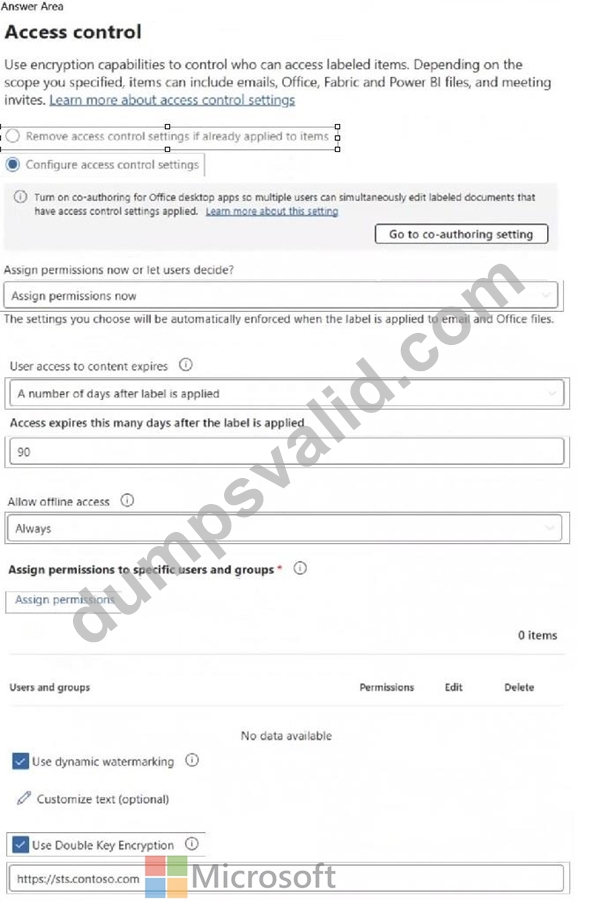
Answer:
Explanation: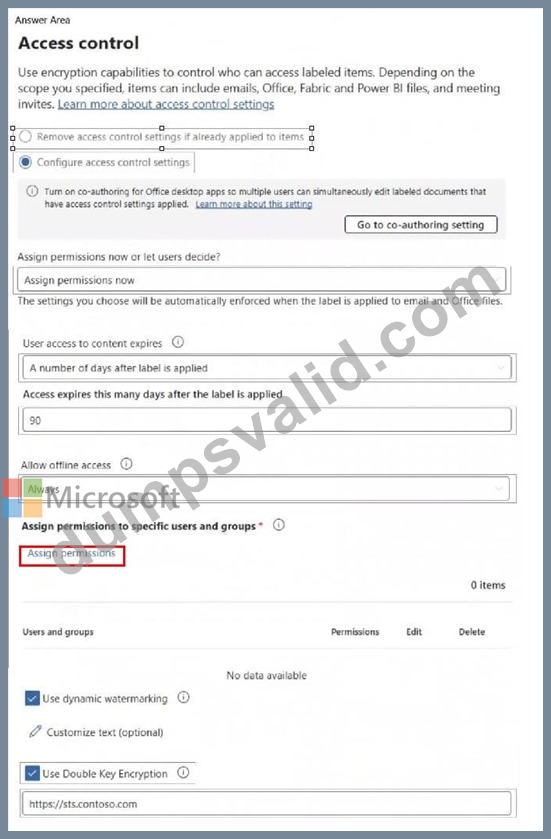
NEW QUESTION # 48
You need to create a trainable classifier that can be used as a condition in an auto-apply retention label policy.
Which three actions should you perform in sequence? To answer, move the appropriate actions from the list of actions to the answer area and arrange them in the correct order.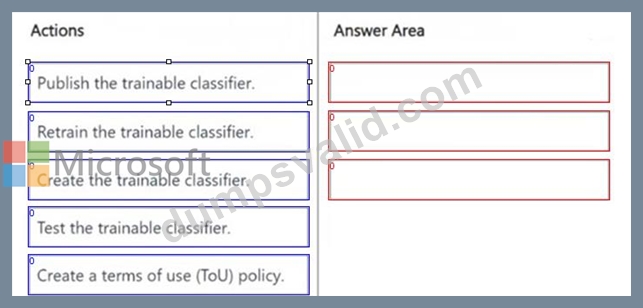
Answer:
Explanation: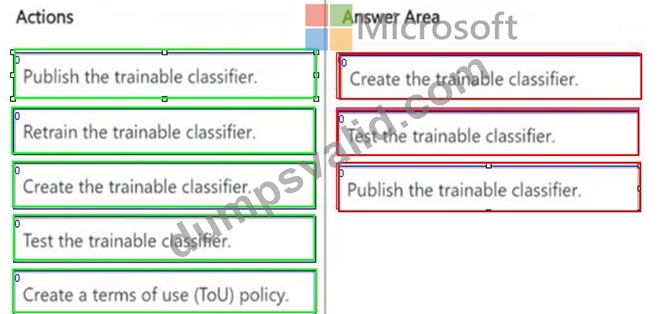
NEW QUESTION # 49
You have a Microsoft 365 E5 subscription.
You plan to implement Microsoft Purview insider risk management.
You implement the HR data connector.
You need to prepare the data that will be imported by the data connector.
In which format should you prepare the data?
- A. TSV
- B. XML
- C. PRN
- D. CSV
- E. JSON
Answer: D
Explanation:
When implementing Microsoft Purview Insider Risk Management and using the HR data connector, you must prepare HR data in CSV (Comma-Separated Values) format. This format is required because Microsoft Purview supports CSV files for importing user employment details, termination dates, role changes, and other HR-related attributes.
NEW QUESTION # 50
You have a Microsoft 365 E5 subscription that uses Microsoft Purview.
You create a communication compliance policy named Policy1 and select Detect Microsoft Copilot interactions.
Which two trainable classifiers will be added to Policy1 automatically? Each correct answer presents part of the solution.
NOTE: Each correct selection is worth one point.
- A. Prompt Shields
- B. Unauthorized disclosure
- C. Threat
- D. Protected Materials
- E. Corporate Sabotage
Answer: B,D
Explanation:
When you create a communication compliance policy in Microsoft Purview and select "Detect Microsoft Copilot interactions," certain trainable classifiers are automatically added to help detect sensitive or inappropriate AI usage.
The "Unauthorized disclosure" classifier helps detect cases where users might share confidential or sensitive information via Copilot interactions, preventing unintended data leaks. The "Protected Materials" classifier is used to identify sensitive or restricted content that should not be shared through Copilot, ensuring compliance with organizational policies.
NEW QUESTION # 51
You have a Microsoft 365 E5 tenant.
You need to add a new keyword dictionary.
What should you create?
- A. a sensitive info type
- B. a trainable classifier
- C. a retention policy
- D. a sensitivity label
Answer: A
Explanation:
To add a new keyword dictionary in Microsoft Purview Data Loss Prevention (DLP), you must create a Sensitive Information Type (SIT).
Sensitive Info Types (SITs) allow you to define custom detection rules, including keyword dictionaries, regular expressions, and functions for identifying sensitive content in emails, documents, and other Microsoft 365 locations. A keyword dictionary is a list of predefined words/phrases that Microsoft Purview can use to identify and classify content for DLP policies.
Steps to add a keyword dictionary:
1. Go to Microsoft Purview compliance portal
2. Navigate to Data classification > Sensitive info types
3. Create a new sensitive info type
4. Add a keyword dictionary
5. Save and use it in a DLP policy
NEW QUESTION # 52
......
Free SC-401 pdf Files With Updated and Accurate Dumps Training: https://www.dumpsvalid.com/SC-401-still-valid-exam.html
Top-Class SC-401 Question Answers Study Guide: https://drive.google.com/open?id=13saWISkUU0KbJKex7a-XnLEnp3lrglgA